SMS Program & Opt-In
Effective date: July 10, 2026 · Last updated: October 24, 2026
This page describes the Shinova SMS/text messaging program operated by Shinova Labs LLC (“Shinova Labs,” “we,” “us,” or “our”) at app.shinova.io. It is intended to give a complete, at-a-glance view of how clients opt in to receive text messages, the exact consent language they see, the categories of messages sent, and how to opt out. All messages referenced below are sent by Shinova Labs as the message sender of record.
1. Where and When Consent Is Collected
Every way a person can start receiving texts from Shinova is listed below. There are no others. Promotional messages are sent only to people who checked the separate promotional box in (a) or (b), or turned promotional texts on in (e).
(a) Creating a client account. The client sign-up flow, at:
https://app.shinova.io/signup
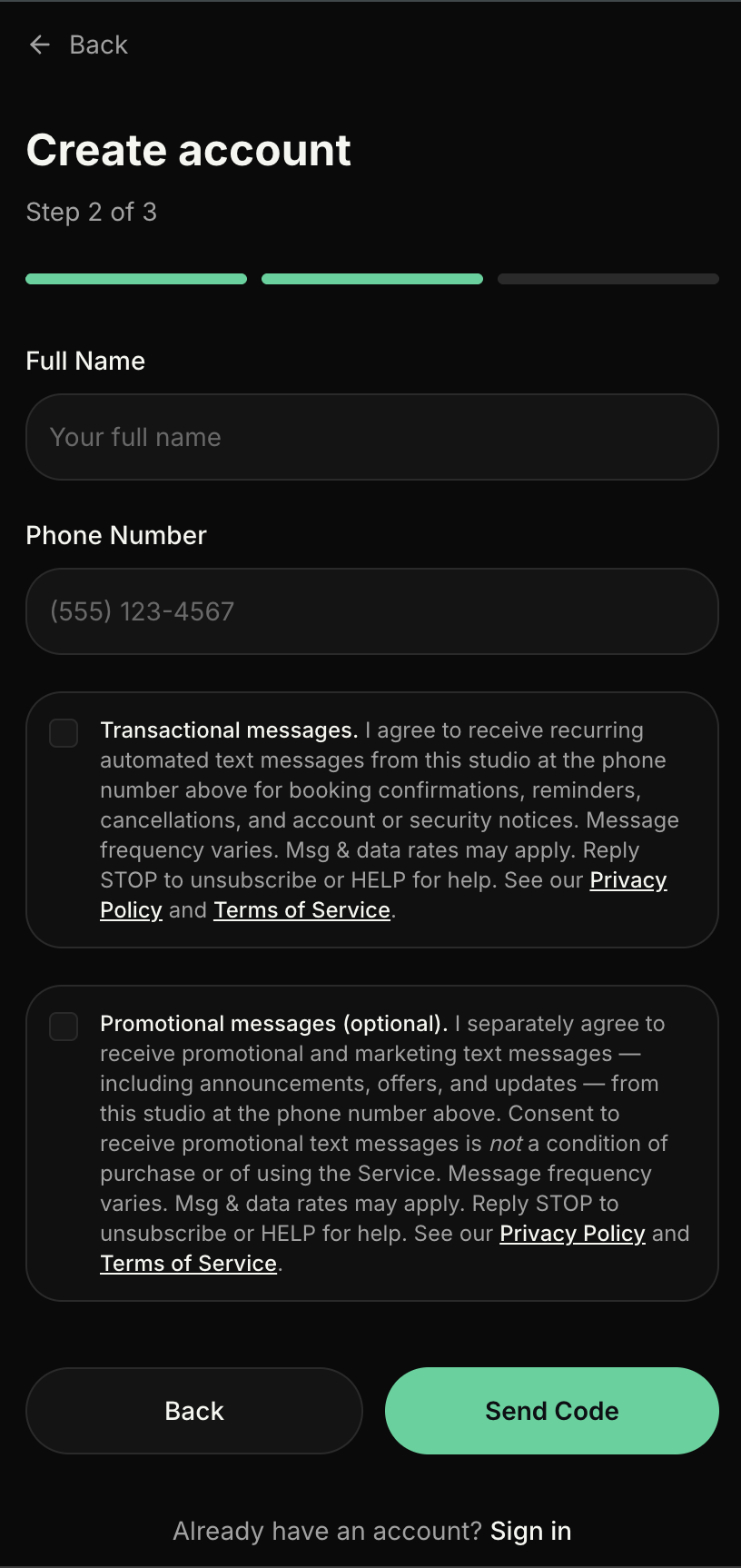
The same page is also served on each business’s own address (for example, [business].app.shinova.io/signup). The sign-up flow is a short wizard. On the second step, after the client has entered basic account information, they are asked for their full name and mobile phone number. Directly below the phone number field are two independent SMS opt-in checkboxes — one for transactional messages and one for promotional messages — with the exact consent language shown in Section 2 below.
Both checkboxes are unchecked by default and both are optional. The client must actively check each box to grant that specific consent; the two consents are collected independently and are never bundled. Consent to receive promotional/marketing text messages is not a condition of purchase or of using the Service. A client may opt in to transactional messages only, promotional messages only, both, or neither.
(b) Claiming an existing account. When a business moves its existing clients onto Shinova, each client is invited to claim their account. The claim page shows the same two unchecked, independent checkboxes with the same wording as Section 2.
(c) Booking as a guest. A person can book a class, an appointment, or an event ticket without creating an account. The booking form requires a mobile number so the business can confirm and remind them about that booking. Directly under the phone number field, before they submit, the guest sees this disclosure:
By entering your phone number, you agree to receive automated text messages from this business about your booking: confirmations, reminders, and changes. Message frequency varies, up to approximately 10 messages per month. Msg & data rates may apply. Reply STOP to unsubscribe or HELP for help. See our SMS Terms and Privacy Policy.
A guest receives transactional messages only. No promotional or marketing message is ever sent on the strength of a guest booking.
(d) At the front desk.A client who arrives in person can ask the business’s staff to text them a link to sign a waiver or pay for that day’s visit. Staff enter the number the client gives them, and the client receives that one requested link. This is a transactional message.
(e) Account settings. A signed-in client can turn transactional texts and promotional texts on or off separately, at any time, from their profile.
(f) Texting START. A person who previously replied STOP can resume transactional messages by replying START, YES, or UNSTOP. A text reply never turns promotional messages back on; that takes the promotional setting in (e).
(g) Invitations from a business.When a business adds a client or a team member and enters their mobile number, Shinova sends that person one invitation text, on the business’s behalf, with a link to create their account. No further message is sent to them until they opt in through (a) or (b). Clients moved over from a business’s previous system are not opted in to any text messages by that move; they opt in only by checking the boxes in (b).
Every message, on every path above, ends with instructions to reply STOP to opt out and HELP for help.
2. Exact Opt-In Consent Language (both checkboxes)
The following language appears next to each of the two SMS opt-in checkboxes on the sign-up page. This is the exact wording a client sees at the moment they grant each consent.
Transactional messages.I agree to receive recurring automated text messages from this studio at the phone number above for booking confirmations, reminders, cancellations, and account or security notices. Message frequency varies — up to approximately 10 messages per month. Msg & data rates may apply. Reply STOP to unsubscribe or HELP for help. See our Privacy Policy and Terms of Service.
Promotional messages (optional).I separately agree to receive promotional and marketing text messages — including announcements, offers, and updates — from this studio at the phone number above. Consent to receive promotional text messages is not a condition of purchase or of using the Service. Message frequency varies — up to approximately 10 messages per month. Msg & data rates may apply. Reply STOP to unsubscribe or HELP for help. See our Privacy Policy and Terms of Service.
3. Visual Preview of the Opt-In Area (as rendered on the sign-up page)
The following is a visual replica of the phone-number field and the two independent SMS consent checkboxes as they appear on step 2 of the client sign-up wizard at https://app.shinova.io/signup. Both checkboxes are unchecked by default; the client must actively check each one to grant that specific consent.
Note: the fields and checkboxes above are disabled on this page because this is a preview. On the live sign-up page at /signup, the fields are editable and each checkbox is independently interactive. The two consents are never bundled — a client may check either, both, or neither.
The following screenshot shows the same area captured directly from the live sign-up page:
4. Categories of Messages
- Transactional: booking confirmations, reminders, schedule changes, cancellations, receipts, payment notifications, and account or security notices.
- Promotional (opt-in only): announcements, offers, and updates sent by Shinova Labs, which may include content from the business the client is connected with on the platform.
5. Message Frequency
Message frequency varies based on the client’s activity and preferences. Clients may receive up to approximately 10 messages per month for transactional notifications and, if opted in, additional promotional messages.
6. Message and Data Rates
Message and data rates may apply. Check your mobile plan for details. Shinova Labs is not responsible for charges imposed by your wireless carrier.
7. Opt-In, Opt-Out, and Help Keywords
Clients may manage their subscription at any time using the standard keywords supported by our program:
- Opt-in keywords: START, YES, UNSTOP, JOIN
- Opt-out keywords: OPTOUT, CANCEL, END, QUIT, UNSUBSCRIBE, REVOKE, STOP, STOPALL
- Help keywords: HELP, INFO
8. Sample System Messages
Shinova: You are now opted in to receive booking messages from your provider. Msg frequency varies, up to 10/mo. Msg & data rates may apply. Reply HELP for help, STOP to opt out.
You have successfully been unsubscribed. You will not receive any more messages from this number. Reply START to resubscribe.
Shinova: Help for texts from your booking provider. Email support@shinova.io. Msg & data rates may apply. Reply STOP to opt out.
9. Sample Program Messages
Shinova: Hi [First Name], this is a reminder from [Business Name] that your booking is scheduled for [Date] at [Time]. Questions? Reply to this message. Reply STOP to opt out.
Shinova: Your booking with [Business Name] is confirmed for [Date] at [Time]. To reschedule, visit [URL]. Message and data rates may apply. Reply STOP to opt out.
Shinova: [Business Name] here — new spots are available for next week. Book your session now at [URL]. Reply STOP to unsubscribe. Message and data rates may apply.
Shinova: Hi [First Name], your payment of $[Amount] to [Business Name] has been received. Thank you! For support visit [URL]. Reply STOP to opt out.
Shinova: [Business Name]: We have an update for our clients — [Message Content]. For more info visit [URL]. Message and data rates may apply. Reply STOP to unsubscribe.
10. Privacy of Mobile Information
No mobile information will be shared with third-parties/affiliates for marketing/promotional purposes. All categories of information sharing described in our Privacy Policy exclude text messaging originator opt-in data and consent; this information will not be shared with any third parties.
For the complete privacy disclosures, see our Privacy Policy. For the platform terms of service, see our Terms of Service.
11. Contact
Questions about the SMS program? Contact us: